stt::file::File Class Reference
读写磁盘文件的类 More...
#include <sttnet.h>
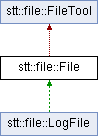
Inheritance diagram for stt::file::File:
Public Member Functions | |
| bool | openFile (const std::string &fileName, const bool &create=true, const int &multiple=0, const size_t &size=0, const mode_t &mode=0666) |
| 打开文件 | |
| bool | closeFile (const bool &del=false) |
| 关闭已打开了的文件 | |
| ~File () | |
| 析构函数 | |
| bool | isOpen () |
| 判断对象是否打开了文件 | |
| bool | isBinary () |
| 判断对象是否以二进制模式打开文件 | |
| std::string | getFileName () |
| 获取打开的文件名字 | |
| uint64_t | getFileLine () |
| 获取打开的文件的行数 | |
| size_t | getFileSize () |
| 获取二进制打开的文件的大小 | |
| size_t | getSize1 () |
| 获取二进制打开的文件在内存中的大小 | |
| bool | lockMemory () |
| 把数据从磁盘读入内存 | |
| bool | unlockMemory (const bool &rec=false) |
| 把数据从内存写入磁盘 | |
操作内存中的数据的函数-文本模式 | |
| int | findC (const std::string &targetString, const int linePos=1) |
| 查找行 | |
| bool | appendLineC (const std::string &data, const int &linePos=0) |
| 插入行 | |
| bool | deleteLineC (const int &linePos=0) |
| 删除行 | |
| bool | deleteAllC () |
| 删除全部 | |
| bool | chgLineC (const std::string &data, const int &linePos=0) |
| 修改行 | |
| bool | readLineC (std::string &data, const int linePos) |
| 读取单行 | |
| std::string & | readC (std::string &data, const int &linePos, const int &num) |
| 读取行 | |
| std::string & | readAllC (std::string &data) |
| 读取全部 | |
操作内存中的数据的函数-二进制模式 | |
| bool | readC (char *data, const size_t &pos, const size_t &size) |
| 读取数据块 | |
| bool | writeC (const char *data, const size_t &pos, const size_t &size) |
| 写数据块 | |
| bool | formatC () |
| 格式化数据 | |
直接操作磁盘数据的函数-文本模式 | |
| int | find (const std::string &targetString, const int linePos=1) |
| 查找行 | |
| bool | appendLine (const std::string &data, const int &linePos=0) |
| 插入行 | |
| bool | deleteLine (const int &linePos=0) |
| 删除行 | |
| bool | deleteAll () |
| 删除全部 | |
| bool | chgLine (const std::string &data, const int &linePos=0) |
| 修改行 | |
| bool | readLine (std::string &data, const int linePos) |
| 读取单行 | |
| std::string & | read (std::string &data, const int &linePos, const int &num) |
| 读取行 | |
| std::string & | readAll (std::string &data) |
| 读取全部 | |
直接操作磁盘数据的函数-二进制模式 | |
| bool | read (char *data, const size_t &pos, const size_t &size) |
| 读取数据块 | |
| bool | write (const char *data, const size_t &pos, const size_t &size) |
| 写数据块 | |
| void | format () |
| 格式化数据 | |
Protected Attributes | |
| std::mutex | che |
Static Protected Attributes | |
| static std::mutex | l1 |
| static std::unordered_map< std::string, FileThreadLock > | fl2 |
Detailed Description
读写磁盘文件的类
- Note
- 1、本类的同一个对象能确保同步性和线程安全
- 2、如果用本类的对象操作同一个文件也能保证同步性。但注意打开的时候统一这个文件的路径,要么用绝对路径,要么用相对路径。
- 3、这个类操作文件的时候有两种模式:1,读取磁盘+操作内存的数据+保存到磁盘;这三步分开做,适合自定义复杂操作的场景。 2,把三步操作合并成一步操作完成
Constructor & Destructor Documentation
◆ ~File()
|
inline |
析构函数
- Note
- 默认对象生命周期结束时关闭文件,不删除文件。
Member Function Documentation
◆ appendLine()
| bool stt::file::File::appendLine | ( | const std::string & | data, |
| const int & | linePos = 0 ) |
插入行
- Note
- 1、在文件中插入一行
- 2、行数从1开始
- Parameters
-
data 需要插入的数据 linePos 在指定行插入(默认从末尾插入)
- Returns
- true 插入成功
- false 插入失败
◆ appendLineC()
| bool stt::file::File::appendLineC | ( | const std::string & | data, |
| const int & | linePos = 0 ) |
插入行
- Note
- 1、在文件导入内存的数据中插入一行
- 2、行数从1开始
- Parameters
-
data 需要插入的数据 linePos 在指定行插入(默认从末尾插入)
- Returns
- true 插入成功
- false 插入失败
◆ chgLine()
| bool stt::file::File::chgLine | ( | const std::string & | data, |
| const int & | linePos = 0 ) |
修改行
- Note
- 1、修改文件中的一行
- 2、行数从1开始
- Parameters
-
data 覆盖到指定行的数据 linePos 需要覆盖的行(默认最后一行)
- Returns
- true 修改成功
- false 修改失败
◆ chgLineC()
| bool stt::file::File::chgLineC | ( | const std::string & | data, |
| const int & | linePos = 0 ) |
修改行
- Note
- 1、修改文件导入内存的数据中的一行
- 2、行数从1开始
- Parameters
-
data 覆盖到指定行的数据 linePos 需要覆盖的行(默认最后一行)
- Returns
- true 修改成功
- false 修改失败
◆ closeFile()
| bool stt::file::File::closeFile | ( | const bool & | del = false | ) |
关闭已打开了的文件
关闭文件
- Parameters
-
del true:删除文件 false:不删除文件 (默认为false)
- Returns
- true:操作成功或已经关闭 false:操作失败
- Note
- 可重复调用;若其他线程正在进行内存事务,会等待事务结束后再关闭。
◆ deleteAll()
| bool stt::file::File::deleteAll | ( | ) |
删除全部
- Note
- 删除文件中的全部行
- Returns
- true 删除成功
- false 删除失败
◆ deleteAllC()
| bool stt::file::File::deleteAllC | ( | ) |
删除全部
- Note
- 删除文件导入内存的数据中的全部
- Returns
- true 删除成功
- false 删除失败
◆ deleteLine()
| bool stt::file::File::deleteLine | ( | const int & | linePos = 0 | ) |
删除行
- Note
- 1、删除文件中的一行
- 2、行数从1开始
- Parameters
-
linePos 需要删除的行
- Returns
- true 删除成功
- false 删除失败
◆ deleteLineC()
| bool stt::file::File::deleteLineC | ( | const int & | linePos = 0 | ) |
删除行
- Note
- 1、删除文件导入内存的数据中的一行
- 2、行数从1开始
- Parameters
-
linePos 需要删除的行
- Returns
- true 删除成功
- false 删除失败
◆ find()
| int stt::file::File::find | ( | const std::string & | targetString, |
| const int | linePos = 1 ) |
查找行
- Note
- 1、查找文件中存在目标字符串的首行
- 2、行数从1开始
- Parameters
-
targetString 需要查找的字符串 linePos 从指定行开始寻找(默认从第一行开始)
- Returns
- >=1 返回匹配的行数
- -1 查找失败
◆ findC()
| int stt::file::File::findC | ( | const std::string & | targetString, |
| const int | linePos = 1 ) |
查找行
- Note
- 1、查找文件导入内存的数据中存在目标字符串的首行
- 2、行数从1开始
- Parameters
-
targetString 需要查找的字符串 linePos 从指定行开始寻找(默认从第一行开始)
- Returns
- >=1 返回匹配的行数
- -1 查找失败
◆ format()
| void stt::file::File::format | ( | ) |
格式化数据
- Note
- 把文件的数据全部删除
◆ formatC()
| bool stt::file::File::formatC | ( | ) |
格式化数据
- Note
- 把文件导入内存的数据全部删除
◆ getFileLine()
|
inline |
获取打开的文件的行数
- Returns
- 返回打开的文件的行数
- Warning
- 1,只有在文本模式下打开才可能返回正确的值
- 2,获取的是上一次读入内存的时候的文件的行数
- 3,如果没有把文件读入过内存,返回的值不会是正确的
- Note
- 这个函数也许只有在操作内存数据的时候有作用
◆ getFileName()
|
inline |
获取打开的文件名字
- Returns
- 返回一个打开的文件的名字的字符串
◆ getFileSize()
|
inline |
获取二进制打开的文件的大小
- Returns
- 返回二进制打开的文件的大小
- Warning
- 1,只有在二进制模式下打开才可能返回正确的值
- 2,获取的是上一次读入内存的时候的文件的大小
- 3,如果没有把文件读入过内存,返回的值不会是正确的
- Note
- 这个函数也许只有在操作内存数据的时候有作用
◆ getSize1()
|
inline |
获取二进制打开的文件在内存中的大小
- Returns
- 返回二进制打开的文件在内存中的大小
- Warning
- 1,只有在二进制模式下打开才可能返回正确的值
- 2,获取的是此时内存中操作的文件的大小
- 3,如果没有把文件读入过内存,返回的值不会是正确的
- Note
- 这个函数只有在操作内存数据的时候有作用
◆ isBinary()
|
inline |
判断对象是否以二进制模式打开文件
- Returns
- true:对象以二进制模式打开文件 false:对象不以二进制模式打开文件
◆ isOpen()
|
inline |
判断对象是否打开了文件
- Returns
- true:对象打开了文件 false:对象没有打开文件
◆ lockMemory()
| bool stt::file::File::lockMemory | ( | ) |
◆ openFile()
| bool stt::file::File::openFile | ( | const std::string & | fileName, |
| const bool & | create = true, | ||
| const int & | multiple = 0, | ||
| const size_t & | size = 0, | ||
| const mode_t & | mode = 0666 ) |
打开文件
- Parameters
-
fileName 打开文件的名字(可以用绝对路径或者相对路径) create true:当文件不存在的时候创建文件(以及目录) false:当文件不存在的时候不创建文件 (默认为true) multiple 当>=1的时候启用二进制打开文件,这个值为需要操作文件所需的预定的文件空间大小和原文件大小的比值 当<1的时候采用文本模式打开文件 (默认为0 文本模式打开) size 手动填入所需的预定文件空间的大小,当这个参数非0时,不会采用multiple的倍数预留值而是直接用这个预定大小 (单位字节)(默认为0) mode 如果create为true,且文件不存在,用位掩码表示新建文件的权限(默认为0666 rw- rw- rw-)
- Returns
- true:打开成功
- false:打开失败
- Note
- 任何操作都需要先打开文件
- 二进制模式下写入超过预留空间会安全返回 false;空文件如需写入,应通过 size 指定容量。
示例代码 1: 文本模式打开和程序同一路径下名为"test"的文件
File f;
f.openFile("test");
bool openFile(const std::string &fileName, const bool &create=true, const int &multiple=0, const size_t &size=0, const mode_t &mode=0666)
打开文件
示例代码 2: 二进制模式下打开和程序同一路径下名为"test"的文件,计划只读
示例代码 3: 二进制模式下打开和程序同一路径下名为"test"的文件,预计会写入数据,写入后大小不大于原来文件大小的两倍
示例代码 4: 二进制模式下打开和程序同一路径下名为"test"的文件,预计会写入数据,写入大小不大于1024字节,原文件大小为0
◆ read() [1/2]
| bool stt::file::File::read | ( | char * | data, |
| const size_t & | pos, | ||
| const size_t & | size ) |
读取数据块
- Note
- 1、读取文件中的一块数据
- 2、数据字节单元从0开始
- Parameters
-
data 接收数据的容器 pos 数据起始位置 size 数据块大小
- Returns
- bool 读取成功
- false 读取失败
◆ read() [2/2]
| std::string & stt::file::File::read | ( | std::string & | data, |
| const int & | linePos, | ||
| const int & | num ) |
读取行
- Note
- 1、连续读取文件中的n行
- 2、行数从1开始
- Parameters
-
data 接收数据的字符串容器 linePos 读取的起始位置 num 读取的行的数量
- Returns
- 字符串参数data的引用
◆ readAll()
| std::string & stt::file::File::readAll | ( | std::string & | data | ) |
读取全部
- Note
- 读取文件中的全部
- Parameters
-
data 接收数据的字符串容器
- Returns
- 字符串参数data的引用
◆ readAllC()
| std::string & stt::file::File::readAllC | ( | std::string & | data | ) |
读取全部
- Note
- 读取文件导入内存的数据中的全部
- Parameters
-
data 接收数据的字符串容器
- Returns
- 字符串参数data的引用
◆ readC() [1/2]
| bool stt::file::File::readC | ( | char * | data, |
| const size_t & | pos, | ||
| const size_t & | size ) |
读取数据块
- Note
- 1、读取文件导入内存的数据中的一块数据
- 2、数据字节单元从0开始
- Parameters
-
data 接收数据的容器 pos 数据起始位置 size 数据块大小
- Returns
- bool 读取成功
- false 读取失败
◆ readC() [2/2]
| std::string & stt::file::File::readC | ( | std::string & | data, |
| const int & | linePos, | ||
| const int & | num ) |
读取行
- Note
- 1、连续读取文件导入内存的数据中的n行
- 2、行数从1开始
- Parameters
-
data 接收数据的字符串容器 linePos 读取的起始位置 num 读取的行的数量
- Returns
- 字符串参数data的引用
◆ readLine()
| bool stt::file::File::readLine | ( | std::string & | data, |
| const int | linePos ) |
读取单行
- Note
- 1、读取文件中的单行
- 2、行数从1开始
- Parameters
-
data 接收数据的字符串容器 linePos 读取的行
- Returns
- true 读取成功
- false 读取失败
◆ readLineC()
| bool stt::file::File::readLineC | ( | std::string & | data, |
| const int | linePos ) |
读取单行
- Note
- 1、读取文件导入内存的数据中的单行
- 2、行数从1开始
- Parameters
-
data 接收数据的字符串容器 linePos 读取的行
- Returns
- true 读取成功
- false 读取失败
◆ unlockMemory()
| bool stt::file::File::unlockMemory | ( | const bool & | rec = false | ) |
把数据从内存写入磁盘
- Parameters
-
rec false 不回退操作,把操作结果保存入磁盘; true 回退操作,不保存。(默认为false 不需要回退)。
- Returns
- true 操作成功
- false 操作失败
- Note
- 如果写入磁盘失败会自动回退操作
- 只有成功调用 lockMemory() 的线程可以解锁;其他线程调用会返回 false。
◆ write()
| bool stt::file::File::write | ( | const char * | data, |
| const size_t & | pos, | ||
| const size_t & | size ) |
写数据块
- Note
- 1、往文件中写入一块数据
- 2、数据字节单元从0开始
- Parameters
-
data 装着写入数据的容器 pos 写入位置 size 写入数据块大小
- Returns
- bool 写入成功
- false 写入失败
◆ writeC()
| bool stt::file::File::writeC | ( | const char * | data, |
| const size_t & | pos, | ||
| const size_t & | size ) |
写数据块
- Note
- 1、往文件导入内存的数据中写入一块数据
- 2、数据字节单元从0开始
- Parameters
-
data 装着写入数据的容器 pos 写入位置 size 写入数据块大小
- Returns
- bool 写入成功
- false 写入失败
Member Data Documentation
◆ che
|
protected |
◆ fl2
|
staticprotected |
◆ l1
|
staticprotected |
The documentation for this class was generated from the following file:
- include/sttnet.h
Generated by
 1.13.2