stt::network::WebSocketClient Class Reference
Websocket客户端操作的类 -如果需要重新设置TLS/Https加密的证书,目前需要销毁对象后重新构造 底层TCP默认是阻塞的 More...
#include <sttnet.h>
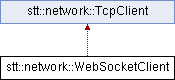
Inheritance diagram for stt::network::WebSocketClient:
Public Member Functions | |
| WebSocketClient (const bool &TLS=false, const char *ca="", const char *cert="", const char *key="", const char *passwd="") | |
| WebSocketClient类的构造函数 | |
| void | setFunction (std::function< bool(const std::string &message, WebSocketClient &k)> fc) |
| 设置收到服务端消息后的回调函数 注册一个回调函数 | |
| bool | connect (const std::string &url, const int &min=20) |
| 连接到websocket服务器 | |
| bool | sendMessage (const std::string &message, const std::string &type="0001") |
| 发送 WebSocket 消息 | |
| void | close (const std::string &closeCodeAndMessage, const bool &wait=true) |
| 发送关闭帧并关闭 WebSocket 连接(简化方式) | |
| void | close (const short &code=1000, const std::string &message="bye", const bool &wait=true) |
| 发送关闭帧并关闭 WebSocket 连接(标准方式) | |
| bool | isConnect () |
| 返回连接状态 | |
| std::string | getUrl () |
| 如果连接到了服务器 返回url | |
| std::string | getServerIp () |
| 如果连接到了服务器 返回服务器ip | |
| std::string | getServerPort () |
| 如果连接到了服务器,以字符串返回服务器端口。 | |
| int | getServerPortNumber () |
| 如果连接到了服务器,以整数返回服务器端口。 | |
| ~WebSocketClient () | |
| WebSocketClient类的析构函数,销毁对象时候会优雅退出断开连接 | |
Detailed Description
Websocket客户端操作的类 -如果需要重新设置TLS/Https加密的证书,目前需要销毁对象后重新构造 底层TCP默认是阻塞的
Constructor & Destructor Documentation
◆ WebSocketClient()
|
inline |
WebSocketClient类的构造函数
- Parameters
-
TLS true:启用wss加密 false:不启用wss加密 (默认为false不启用) ca CA 根证书文件路径;留空时使用操作系统默认信任库。 cert 客户端证书路径(可选 默认空) key 客户端私钥路径(可选 默认空) passwd 私钥解密密码(可选 默认空)
- Note
- TLS 最低版本为 1.2,并同时验证证书链和连接目标主机名。
- ca 留空时使用系统默认根证书;指定时使用给定 CA 文件。 -如果服务端要求客户端身份认证(双向 TLS/SSL),你需要提供一个有效的客户端证书。
◆ ~WebSocketClient()
| stt::network::WebSocketClient::~WebSocketClient | ( | ) |
WebSocketClient类的析构函数,销毁对象时候会优雅退出断开连接
Member Function Documentation
◆ close() [1/2]
| void stt::network::WebSocketClient::close | ( | const short & | code = 1000, |
| const std::string & | message = "bye", | ||
| const bool & | wait = true ) |
发送关闭帧并关闭 WebSocket 连接(标准方式)
构建符合 RFC 6455 的关闭帧(opcode = 0x8),帧 payload 包含关闭码(2 字节)与可选关闭原因字符串。
- Parameters
-
code WebSocket 关闭码,常见包括: - 1000:正常关闭(Normal Closure)
- 1001:终端离开(Going Away)
- 1002:协议错误(Protocol Error)
- 1003:不支持的数据类型(Unsupported Data)
- 1006:非正常关闭(无关闭帧,程序内部使用)
- 1008:策略违规(Policy Violation)
- 1011:服务器内部错误(Internal Error)
message 可选关闭原因,供调试或日志记录用 wait 是否等待底层监听线程/epoll事件处理后退出
◆ close() [2/2]
| void stt::network::WebSocketClient::close | ( | const std::string & | closeCodeAndMessage, |
| const bool & | wait = true ) |
发送关闭帧并关闭 WebSocket 连接(简化方式)
直接传入编码后的关闭 payload,其中前两字节为关闭码(big-endian), 后续为 UTF-8 编码的关闭原因描述,用于简化调用。
- Parameters
-
closeCodeAndMessage 编码后的关闭帧 payload(2 字节关闭码 + 可选消息) wait 是否等待底层监听线程/epoll事件处理后退出
◆ connect()
| bool stt::network::WebSocketClient::connect | ( | const std::string & | url, |
| const int & | min = 20 ) |
连接到websocket服务器
- Parameters
-
url ws/wss的完整url(注意需要显式指定端口和路径) 如:wss://google.com 要写成wss://google.com:443/ (补全:443和/) min 心跳时间,单位分钟 (默认为20分钟)
- Warning
- 需要ws/wss的完整url(注意需要显式指定端口和路径) 如:wss://google.com 要写成wss://google.com:443/ (补全:443和/)
◆ getServerIp()
|
inline |
如果连接到了服务器 返回服务器ip
- Returns
- 返回服务器ip
◆ getServerPort()
|
inline |
如果连接到了服务器,以字符串返回服务器端口。
- Returns
- 十进制端口字符串;未连接时为 "-1"。
- Note
- 为保持源代码兼容保留字符串返回类型;新代码建议使用 getServerPortNumber()。
◆ getServerPortNumber()
|
inline |
如果连接到了服务器,以整数返回服务器端口。
- Returns
- 端口号;未连接时为 -1。
◆ getUrl()
|
inline |
如果连接到了服务器 返回url
- Returns
- 返回url
◆ isConnect()
|
inline |
返回连接状态
- Returns
- true:和服务器存在连接 false:没有连接
◆ sendMessage()
| bool stt::network::WebSocketClient::sendMessage | ( | const std::string & | message, |
| const std::string & | type = "0001" ) |
发送 WebSocket 消息
根据 WebSocket 协议,封装并发送一条带掩码的数据帧(客户端必须使用掩码), 支持根据 payload 长度自动选择帧格式:
- payload <= 125 字节:使用 1 字节长度
- 126 <= payload <= 65535:使用 2 字节扩展长度(附加 126 标记)
- payload > 65535:使用 8 字节扩展长度(附加 127 标记)
- Parameters
-
message 要发送的消息内容(已编码为文本或二进制) type 指定消息类型的自定义字段(通常是 WebSocket 帧的 opcode) 约定格式为 "1000" + type,其中:- "0001" 表示文本帧(Text Frame)
- "0010" 表示二进制帧(Binary Frame)
- "1000" 表示连接关闭(Close Frame)
- "1001" 表示 Ping 帧
- "1010" 表示 Pong 帧 请根据内部约定使用,默认使用 text(文本帧)
- Returns
- true 发送成功
- false 发送失败(可能因连接未建立或发送异常)
◆ setFunction()
|
inline |
设置收到服务端消息后的回调函数 注册一个回调函数
- Parameters
-
fc 一个函数或函数对象,用于收到服务端消息后处理逻辑 -参数:string &message - 要处理的套接字 WebsocketClient &k - 当前对象的引用 -返回: bool - 返回true处理成功,返回false处理失败
- Note
- 传入的函数应该有如下签名 bool func(const std::string &message,WebSocketClient &k)
- 如果处理失败了 会直接关闭整个websocket连接
The documentation for this class was generated from the following file:
- include/sttnet.h
Generated by
 1.13.2