stt::network::HttpClient Class Reference
Http/Https客户端操作类 More...
#include <sttnet.h>
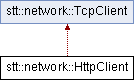
Inheritance diagram for stt::network::HttpClient:
Public Member Functions | |
| HttpClient (const bool &TLS=false, const char *ca="", const char *cert="", const char *key="", const char *passwd="") | |
| HttpClient类的构造函数 | |
| bool | getRequest (const std::string &url, const std::string &header="", const std::string &header1="Connection: keep-alive", const int &sec=-1) |
| 发送一个GET请求到服务器 | |
| bool | postRequest (const std::string &url, const std::string &body="", const std::string &header="", const std::string &header1="Connection: keep-alive", const int &sec=-1) |
| 发送一个POST请求到服务器 | |
| bool | getRequestFromFD (const int &fd, SSL *ssl, const std::string &url, const std::string &header="", const std::string &header1="Connection: keep-alive", const int &sec=2) |
| 从tcp套接字发送一个GET请求到服务器 | |
| bool | postRequestFromFD (const int &fd, SSL *ssl, const std::string &url, const std::string &body="", const std::string &header="", const std::string &header1="Connection: keep-alive", const int &sec=2) |
| 发送一个POST请求到服务器 | |
| bool | isReturn () |
| 获取服务器返回响应状态 | |
Public Attributes | |
| std::string | header ="" |
| 服务器返回响应头 | |
| std::string | body ="" |
| 服务器返回响应体 | |
Detailed Description
Http/Https客户端操作类
- Note
- -请求头都会自动带上Connection: keep-alive -如果需要重新设置TLS/Https加密的证书,目前需要销毁对象后重新构造 -如果没用传入套接字的函数,底层TCP默认是阻塞的
Constructor & Destructor Documentation
◆ HttpClient()
|
inline |
HttpClient类的构造函数
- Parameters
-
TLS true:启用Https加密 false:不启用Https加密 (默认为false不启用) ca CA 根证书文件路径;留空时使用操作系统默认信任库。 cert 客户端证书路径(可选 默认空) key 客户端私钥路径(可选 默认空) passwd 私钥解密密码(可选 默认空)
- Note
- TLS 最低版本为 1.2,并同时验证证书链和连接目标主机名。
- ca 留空时使用系统默认根证书;指定时使用给定 CA 文件。 -如果服务端要求客户端身份认证(双向 TLS/SSL),你需要提供一个有效的客户端证书。
Member Function Documentation
◆ getRequest()
| bool stt::network::HttpClient::getRequest | ( | const std::string & | url, |
| const std::string & | header = "", | ||
| const std::string & | header1 = "Connection: keep-alive", | ||
| const int & | sec = -1 ) |
发送一个GET请求到服务器
- Note
- 返回结果请调用isReturn函数判断;如果有返回结果,返回头和返回体存在header和body这两个全局变量中。
- 如果使用了TLS,会自动采用https协议,否则是自动采用http协议
- 默认是阻塞的
- Parameters
-
url http/https的完整url(注意需要显式指定端口和路径) 如:https://google.com 要写成https://google.com:443/ (补全:443和/) header Http 请求头;如果不是用 createHeader 生成,末尾应包含 CRLF。 header1 HTTP 请求头附加项;末尾不需要加入 CRLF(默认 keep-alive)。 sec 阻塞超时时间(s) 阻塞超过这个时间就不会再阻塞了 默认为-1 即无限等待
- Returns
- true:请求发送成功 false:请求发送失败 注意:这不代表是否返回,只说明了发送成功
- Warning
- 需要http/https协议的完整url(注意需要显式指定端口和路径(就算路径不需要也要填入/)) 如:https://google.com 要写成https://google.com:443/ (补全:443和/)
◆ getRequestFromFD()
| bool stt::network::HttpClient::getRequestFromFD | ( | const int & | fd, |
| SSL * | ssl, | ||
| const std::string & | url, | ||
| const std::string & | header = "", | ||
| const std::string & | header1 = "Connection: keep-alive", | ||
| const int & | sec = 2 ) |
从tcp套接字发送一个GET请求到服务器
- Note
- 返回结果请调用isReturn函数判断;如果有返回结果,返回头和返回体存在header和body这两个全局变量中。
- 如果填入的ssl不为nullptr,会自动采用https协议,否则是自动采用http协议
- 调用的时候会阻塞,改变原有fd的状态,注意备份和恢复
- Parameters
-
fd tcp套接字 ssl TLS加密套接字 url http/https的完整url(注意需要显式指定端口和路径) 如:https://google.com 要写成https://google.com:443/ (补全:443和/) header Http 请求头;如果不是用 createHeader 生成,末尾应包含 CRLF。 header1 HTTP 请求头附加项;末尾不需要加入 CRLF(默认 keep-alive)。 sec 阻塞超时时间(s) 阻塞超过这个时间就不会再阻塞了 默认为2s
- Returns
- true:请求发送成功 false:请求发送失败 注意:这不代表是否返回,只说明了发送成功
- Warning
- 需要http/https协议的完整url(注意需要显式指定端口和路径(就算路径不需要也要填入/)) 如:https://google.com 要写成https://google.com:443/ (补全:443和/)
◆ isReturn()
|
inline |
获取服务器返回响应状态
- Returns
- true:服务器返回响应成功 false:服务器返回响应失败
◆ postRequest()
| bool stt::network::HttpClient::postRequest | ( | const std::string & | url, |
| const std::string & | body = "", | ||
| const std::string & | header = "", | ||
| const std::string & | header1 = "Connection: keep-alive", | ||
| const int & | sec = -1 ) |
发送一个POST请求到服务器
- Note
- 返回结果请调用isReturn函数判断;如果有返回结果,返回头和返回体存在header和body这两个全局变量中。
- 如果使用了TLS,会自动采用https协议,否则是自动采用http协议
- 默认是阻塞的
- Parameters
-
url http/https的完整url(注意需要显式指定端口和路径) 如:https://google.com 要写成https://google.com:443/ (补全:443和/) body http请求体 header Http 请求头;如果不是用 createHeader 生成,末尾应包含 CRLF。 header1 HTTP 请求头附加项;末尾不需要加入 CRLF(默认 keep-alive)。 sec 阻塞超时时间(s) 阻塞超过这个时间就不会再阻塞了 默认为-1 即无限等待
- Returns
- true:请求发送成功 false:请求发送失败 注意:这不代表是否返回,只说明了发送成功
- Warning
- 需要http/https协议的完整url(注意需要显式指定端口和路径(就算路径不需要也要填入/)) 如:https://google.com 要写成https://google.com:443/ (补全:443和/)
◆ postRequestFromFD()
| bool stt::network::HttpClient::postRequestFromFD | ( | const int & | fd, |
| SSL * | ssl, | ||
| const std::string & | url, | ||
| const std::string & | body = "", | ||
| const std::string & | header = "", | ||
| const std::string & | header1 = "Connection: keep-alive", | ||
| const int & | sec = 2 ) |
发送一个POST请求到服务器
- Note
- 返回结果请调用isReturn函数判断;如果有返回结果,返回头和返回体存在header和body这两个全局变量中。
- 如果填入的ssl不为nullptr,会自动采用https协议,否则是自动采用http协议
- 调用的时候会阻塞,改变原有fd的状态,注意备份和恢复
- Parameters
-
fd tcp套接字 ssl TLS加密套接字 url http/https的完整url(注意需要显式指定端口和路径) 如:https://google.com 要写成https://google.com:443/ (补全:443和/) body http请求体 header Http 请求头;如果不是用 createHeader 生成,末尾应包含 CRLF。 header1 HTTP 请求头附加项;末尾不需要加入 CRLF(默认 keep-alive)。 sec 阻塞超时时间(s) 阻塞超过这个时间就不会再阻塞了 默认为-1 即无限等待
- Returns
- true:请求发送成功 false:请求发送失败 注意:这不代表是否返回,只说明了发送成功
- Warning
- 需要http/https协议的完整url(注意需要显式指定端口和路径(就算路径不需要也要填入/)) 如:https://google.com 要写成https://google.com:443/ (补全:443和/)
Member Data Documentation
◆ body
| std::string stt::network::HttpClient::body ="" |
服务器返回响应体
◆ header
| std::string stt::network::HttpClient::header ="" |
服务器返回响应头
The documentation for this class was generated from the following file:
- include/sttnet.h
Generated by
 1.13.2